
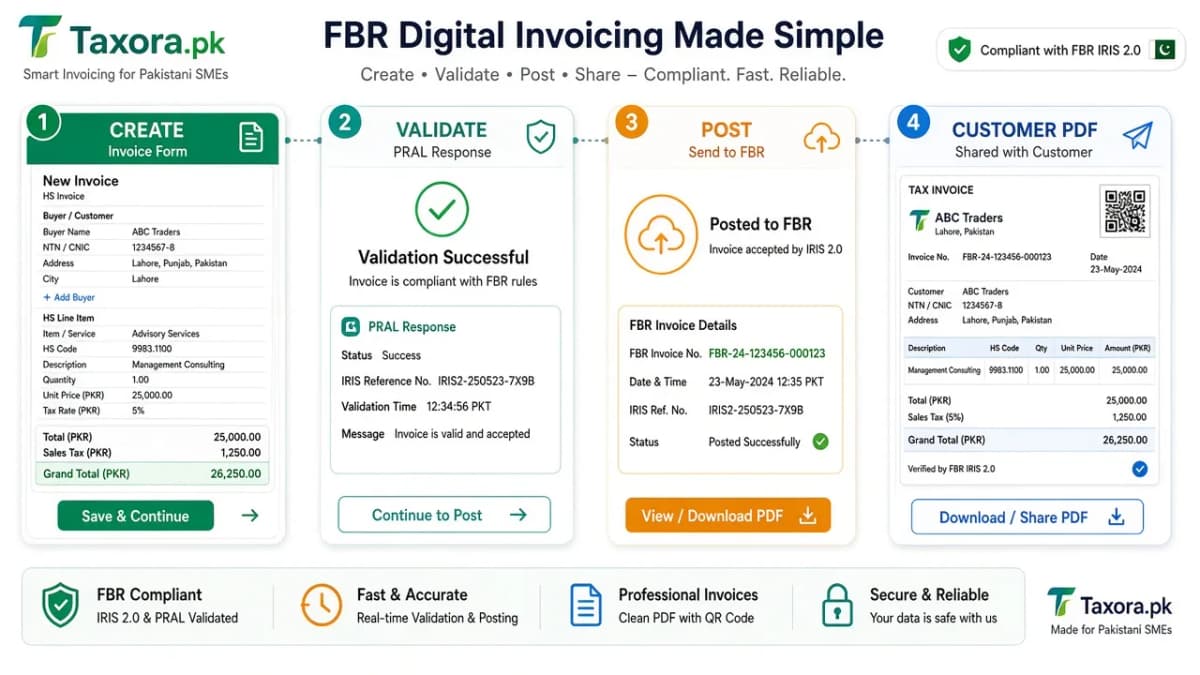
Taxora.pk is a browser workspace for FBR digital invoicing in Pakistan. You create the sales tax invoice, send it through PRAL to validate then post, and keep the FBR invoice number plus QR on the customer PDF. This page explains the full loop in plain language - without claiming Taxora is FBR or PRAL.
Try the live invoice loop
Click through Create → Validate → Post → QR PDF the way teams use Taxora. Validate/post need a working production token; sandbox is for scenario practice only.
Try it live
Day-to-day invoice loop
Create → Validate → Post → QR PDF - click a step or press Next.
Step 1 of 4 · Draft the invoice
Create
Pick buyer, sale type, province, and line items (HS, UOM, qty, rate, tax). Optional PDF columns from Profile can show on the draft.
Live preview
INV-1048
Buyer
Sialkot Sports Gear Co
HS · UOM
5205.1100 · KG
Tax
18% GST
What Taxora is (and is not)
Taxora is invoicing software. It stores buyers and products, builds the invoice JSON FBR expects, shows readable validation errors, posts accepted invoices, and prints a compliant PDF. It does not replace IRIS registration, IP whitelisting, or PRAL token issuance. Those stay with FBR/PRAL. Taxora.pk is independent software and is not affiliated with FBR or PRAL.
The five stages, in order
- Register in IRIS - open Digital Invoicing, add contacts and system details, choose PRAL or another licensed integrator.
- Whitelist IPs and get a sandbox token - PRAL only accepts calls from approved public IPs. The security token goes in the
Authorization: Bearer …header (FBR DI API V1.12). - Pass sandbox scenarios - practise validate/post with test data until PRAL marks scenarios complete, then request a production token.
- Work in Taxora - create invoices (single or bulk Excel), validate, fix errors, post, download QR PDFs.
- Keep records - store FBR invoice numbers, responses, and PDFs for audit.
Steps 1–3 are covered in detail in Connect PRAL in 6 steps and sandbox vs production tokens.
What you do inside Taxora every day
1. Create the invoice
Pick the buyer, sale type, province, and line items (HS code, UOM, quantity, rate, tax). Optional custom line columns (batch, lot, etc.) can appear on the PDF for your warehouse - see custom invoice columns. Nothing is sent to FBR until you choose validate or post.
2. Validate
Validate asks PRAL to check the invoice against FBR rules without finalising it. If something is wrong (HS/UOM mismatch, buyer type, rate, SRO field), Taxora shows a clear message so you can fix and retry. Use validate liberally - it is cheaper than cleaning up a bad post.
3. Post
Post submits the invoice for real. On acceptance FBR returns an invoice number and QR payload. Taxora stores both and builds the customer PDF with the Digital Invoicing logo and QR as required by FBR’s printing rules.
4. Bulk when volume is high
Excel upload groups rows by invoice number, validates each (or the batch), then posts. Every attempt can keep request/response history for support and audit. Details: bulk invoice upload.
Sandbox token vs production token in Taxora
Store both under Integration → FBR. Use the sandbox token for assigned scenario practice with test data. Use the production token when you validate or post real invoices. Routing follows the token FBR/PRAL issued - the API URLs stay the same; the token decides the environment (DI API V1.12). Never paste a production token into a shared demo account. Details: sandbox vs production tokens.
Who should use this path
- SMEs and distributors who need daily FBR e-invoices without building an ERP integration
- Teams that want readable validation errors before posting
- Finance users who need QR PDFs and a simple audit trail
If you have a large custom ERP and in-house developers, you may connect to PRAL directly. Compare paths in PRAL vs integrator vs software.
Quick FAQ
Do I still need PRAL if I use Taxora? Yes. Taxora talks to the Digital Invoicing API that PRAL runs for FBR. You still complete IRIS, whitelist, and tokens.
Is Taxora “FBR approved”? No honest product should claim that phrase. FBR publishes licensed integrators; Taxora is software that uses the integration path you registered.
Where do I start? Message us on WhatsApp for a guided trial, or read What is PRAL? first if you are new to the terms.
Common questions
What does Taxora do in one sentence?
It creates sales tax invoices, validates and posts them through PRAL to FBR, then stores the invoice number and QR on the customer PDF.
Do I still need a sandbox token?
Yes. Practise with the sandbox token and scenarios first, then switch Taxora to the production token for live invoices.
Is Taxora FBR or PRAL?
No. Taxora.pk is independent invoicing software built by Linastack.
More guides
- 01Custom Invoice Line Columns in Taxora.pkAdd up to five custom line columns in Profile - batch, lot, colour - and print them on your FBR QR PDF without…Open
- 02About Taxora.pkWho builds Taxora.pk, how it relates to pra.taxora.pk, and what the product does for FBR / PRAL digital invoic…Open
- 03Digital invoicing with PRA (Punjab)How digital invoicing with PRA works on pra.taxora.pk: PRA eIMS digital invoices, one USIN per sale, POS, and …Open
- 04Cloud FBR invoicing softwareHow to evaluate cloud FBR invoicing software: licensed integration path, validate/post, QR PDFs, bulk upload, …Open