
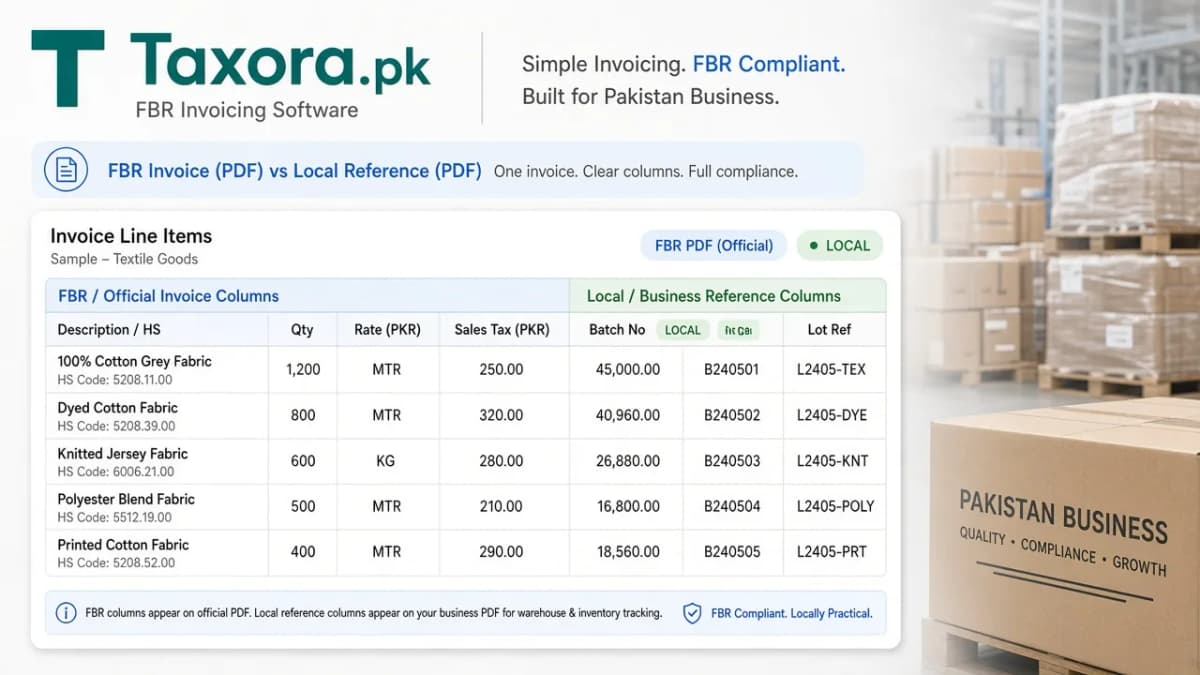
Your warehouse needs batch numbers, lot codes, or colour on the printed invoice. FBR only needs official tax fields. In Taxora, Profile → Invoice line columns lets you add optional headers (and built-in P.O # / Qty PCS) for your records and the customer PDF - they are not sent to FBR or PRAL.
Please read first
Custom column data (Batch No, Lot Ref, Colour, and any other headers you add) stays inside Taxora for record keeping and PDF printing. Built-in optional columns P.O # and Qty PCS work the same way. The validate and post calls to PRAL only include official Digital Invoicing fields such as HS code, UOM, quantity, rate, and tax.
Try the live Profile demo
Walk through the real sequence: open Profile → Invoice line columns, type a header name, set Default on / Required, drag to reorder, Save, and watch the wide PDF preview update. Max 5 custom columns; headers ≤ 40 characters; type Text or Number.
Try it live
Profile → Invoice line columns
Add header · Default on / Required · drag · Save. Local columns stay off FBR / PRAL.
Open Profile → Invoice line columns. Add a header, toggle Default on, drag, then Save.
Column catalog
- Built-in
- Built-in
- Custom
- Custom
Live PDF preview
How the invoice table looks
3 local · FBR always on
| Description / HSFBR | QtyFBR | RateFBR | Sales taxFBR | P.O #local | Batch Nolocal | Lot Reflocal |
|---|---|---|---|---|---|---|
| Cotton yarn - HS 5205 | 120 | 850 | 18% | PO-1042 | B-2401 | L-88 |
| Packaging film - HS 3920 | 40 | 1,200 | 18% | PO-1042 | B-2410 | L-12 |
What goes where
| Column type | Examples | Sent to FBR / PRAL? | Where you see it |
|---|---|---|---|
| Official FBR fields | Description / HS, Qty, Rate, Sales tax, UOM | Yes | Invoice form · Validate · Post · PDF |
| Built-in optional (Profile) | P.O #, Qty PCS | No | Records · Customer PDF |
| Custom (Profile) | Batch No, Lot Ref, Colour, Size, Expiry | No | Records · Customer PDF |
How to set them up in Taxora
| Step | What you do |
|---|---|
| 1 | Open Profile → Invoice line columns |
| 2 | Keep or rename built-in P.O # / Qty PCS; drag to reorder |
| 3 | Add custom column (max 5). Header ≤ 40 characters. Text or number. |
| 4 | Set Default on / Required as needed, then Save columns |
| 5 | On each new invoice, defaults apply; you can still toggle columns, fill values, then print PDF |
Examples teams use
| Business | Useful custom headers |
|---|---|
| Pharma / FMCG | Batch No, Lot Ref, Expiry |
| Apparel | Colour, Size |
| Distributors | Container, Vehicle ref, P.O # |
| Any SME | Internal SKU next to HS description |
Portrait vs landscape
Many optional columns can make portrait PDFs tight. Landscape keeps headers readable. Pick the format that matches how many columns you actually print.
How this fits the FBR loop
Optional columns never change validate/post. You still create → validate → post → QR PDF as in how Taxora works. They only enrich what the buyer sees on paper after FBR accepts the invoice.
Common questions
Are custom columns sent to FBR?
No. Custom and optional built-in columns (P.O #, Qty PCS) are for record keeping and PDF printing only. PRAL validate/post only receives official Digital Invoicing fields.
How many custom columns can I add?
Up to five custom columns, with header labels up to 40 characters each.
Where do I configure them?
Profile → Invoice line columns. Enable the ones you need on each invoice before printing.
More guides
- 01How Taxora works for FBR invoicingPlain-English tour of Taxora.pk: IRIS and tokens first, then create → validate → post → QR PDF, sandbox vs liv…Open
- 02About Taxora.pkWho builds Taxora.pk, how it relates to pra.taxora.pk, and what the product does for FBR / PRAL digital invoic…Open
- 03Digital invoicing with PRA (Punjab)How digital invoicing with PRA works on pra.taxora.pk: PRA eIMS digital invoices, one USIN per sale, POS, and …Open
- 04Cloud FBR invoicing softwareHow to evaluate cloud FBR invoicing software: licensed integration path, validate/post, QR PDFs, bulk upload, …Open