
01
Live PRAL validation
Check the buyer, tax lines, and payload against FBR before you post - so errors show up early, not at month-end.
Taxora.pk
FBR digital invoicing software for Pakistan · PRAL ready
Taxora.pk is FBR digital invoicing software for Pakistan. Build the invoice, validate with PRAL, post to FBR, then keep the QR PDF. Bulk Excel on eligible plans. Trial via WhatsApp; go-live fee is required.
First month free on every plan
Interactive product tour
Real dropdowns · draft → PRAL → FBR → QR PDF
Create → Fill → Validate → Post
Live demo
What Taxora.pk is
Software for Pakistan’s FBR digital sales tax path: build the invoice, validate with PRAL, post live, then keep the QR PDF and reports.
The path every invoice follows
Draft to live - nothing posts until PRAL checks pass.
Full walkthrough
See how Taxora worksThe working sequence
Orange draft → forest validate → teal post → brass PDF. Nothing posts before validation passes.
Web form or bulk Excel - build the invoice once, including optional custom PDF columns.
Draft stays editable until NTNs, HS codes, and tax pass PRAL checks.
Green Post submits only validated invoices. Track until FBR accepts.
Keep FBR number + QR PDF for the buyer and your audit file.
Product tour
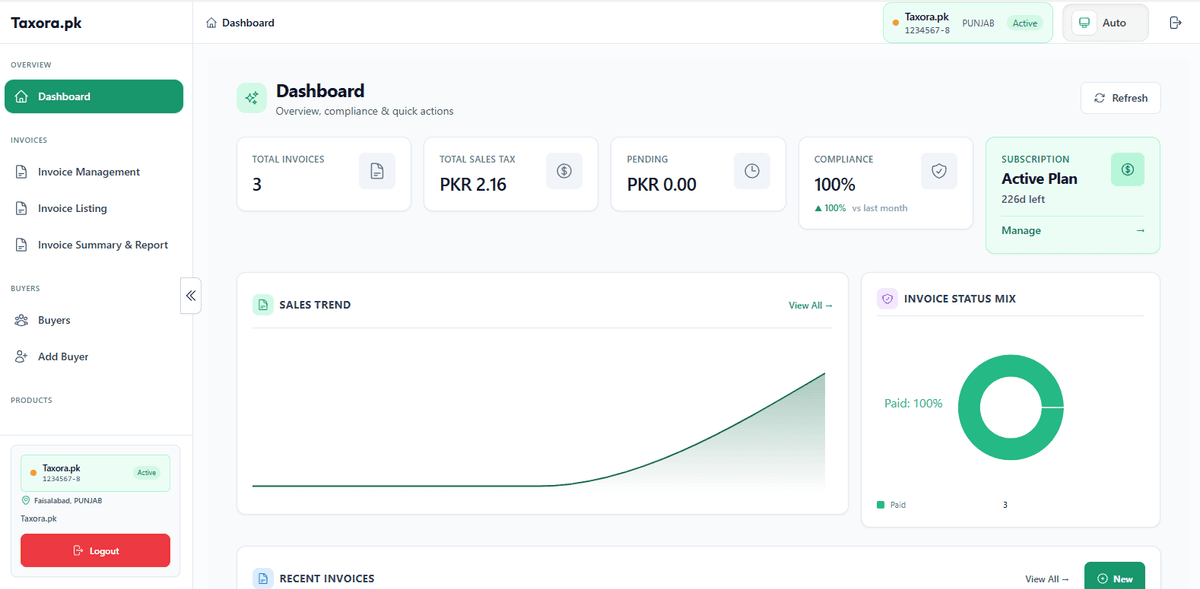
Three steps in Taxora.pk. Click through the tour, then scan what the workspace actually ships.

Taxora.pk
3-step tour
Draft → Check & post → PDF. Tap a step anytime.
Create the invoice
Watch: Pick a buyer and product, then save the draft.
New FBR invoice
Required fields are marked and checked before save
In the workspace
What you use every day - validate, bulk, directories, and the PDF your auditor expects.
Check the buyer, tax lines, and payload against FBR before you post - so errors show up early, not at month-end.
Bring a day of invoices in one file, review issues in Taxora, then validate and post the clean rows.
Add your own PDF columns (P.O #, Qty PCS, and up to five customs) for records - not sent to FBR.
When FBR accepts the invoice, you keep the official reference and QR on the PDF your customer and auditor expect.
Save NTN/CNIC, registration type, province, and address once - reuse them on every new invoice.
Seller profile plus separate sandbox and production tokens for PRAL validate and post when your plan allows.
Full catalog
See all featuresHow Taxora compares
Taxora keeps create → PRAL validate → FBR post → QR PDF in one place - plus custom PDF columns and separate sandbox / production tokens.
Live PRAL validate & FBR post
Create → check → submit in one workspace
Bulk Excel review then post
Fix rows before anything hits FBR
Sandbox + production tokens
Separate modes for scenarios vs go-live
Request / response before lock
See what PRAL returns before you commit
Custom PDF line columns
P.O #, Qty PCS + customs - record-only
QR PDF after FBR accept
Official reference on the customer PDF
Buyer & product catalogs
Reuse NTN, HS, UOM, tax rates
Modern web workspace
Not a static Word/Excel template pack
Sister product · pra.taxora.pk
Taxora.pk is for federal FBR digital sales tax invoices (PRAL validate → post → QR PDF). For counter sales with PRA, SRB, KPRA, or BRA stamping, use pra.taxora.pk: sell on a tablet, keep one USIN per payment, and unlock the official receipt only after the authority returns Code 100.
Pick the right Taxora
Same Taxora family, different compliance path. WhatsApp demo: +92 306 0849090
Learn
Deeper reading on SRO 709, PRAL, bulk upload, 2026 FBR compliance, and digital invoicing with PRA for Punjab - on the Taxora.pk blog.
Browse all articles on the Taxora.pk blog
Verify against primary FBR sources
FAQ
Straight answers on FBR digital invoicing, PRAL, pricing, and how Taxora.pk fits your workflow.
Public FBR FAQ wording has said PRAL can integrate free on request; re-check the live FBR FAQ before relying on it. Other integrators may charge. Details on the PRAL hub.
Yes for sales tax registered persons named in FBR’s current notifications. SRO 1852(I)/2025 set the phased dates; those dates have passed for the listed groups. Missing them can attract penalties under Section 33 of the Sales Tax Act, 1990.
Basic PKR 1,999/month (100 invoices, PRAL validate & post), Standard PKR 3,499/month (300 invoices, bulk Excel, PRAL), Premium PKR 4,999/month (unlimited invoices, priority support). A one-time PKR 9,999 go-live fee is required and is separate from the monthly plan.
Every business pays PKR 9,999 once to unlock PRAL scenario checks, production setup and live FBR posting. It is mandatory for go-live, not optional, and is not part of the monthly subscription.
Message us on WhatsApp or email first. We turn on a trial with invoices, checks and the dashboard. Message us on WhatsApp or email first. We turn on your trial with full plan features so you can try real FBR / PRAL steps before you pay. Your first paid month is still free after the trial starts.
Create the invoice once (form or Excel), validate it with PRAL, post it to FBR, then download the QR PDF and keep the FBR invoice number. Status, buyers and products stay in one workspace so the next invoice is faster.
Next step
We’ll show how its buyer, line items, tax, validation result, FBR posting, PDF, and Excel record move through Taxora. First month free on every plan.
WhatsApp: +92 306 0849090
Pricing
Official monthly plans in PKR. Contact us first for a free trial with full core features - first month free when you subscribe.
One-time scenario & integration fee (required): PKR 9,999
Every account must pay PKR 9,999 once to unlock PRAL scenario validation, production onboarding, and FBR posting activation. This is not optional and is separate from your monthly plan.
Ask about scenario onboardingPKR 1,999/month
For small businesses starting digital invoicing.
Most popular
PKR 3,499/month
For growing businesses with regular invoice volume.
PKR 4,999/month
Unlimited invoicing and priority support.
Message us on WhatsApp or email first. We turn on your trial with full plan features so you can try real FBR / PRAL steps before you pay.
Ask AI
Tap an icon to open with a Taxora.pk prompt
 ChatGPT
 Claude
 Gemini
 Perplexity
 Copilot
 Grok
Grok