
PRAL explained
What is PRAL? Pakistan Revenue Automation Limited explained
By Taxora.pk compliance team · Last updated 2026-10-18
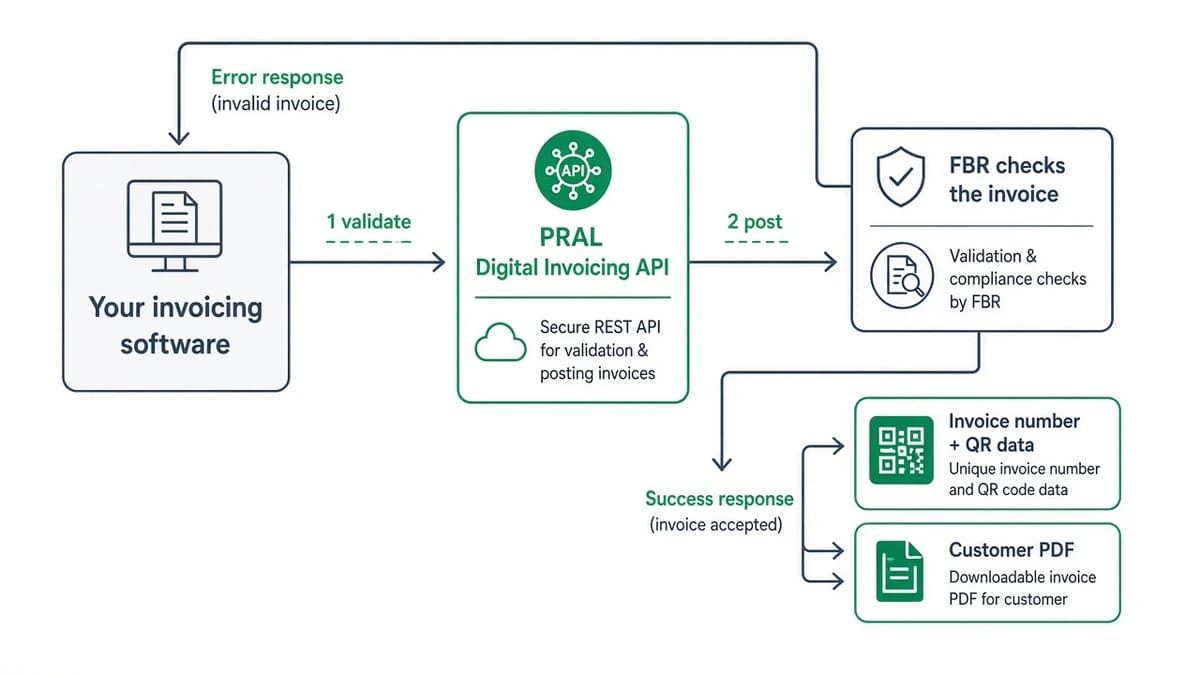
PRAL stands for Pakistan Revenue Automation Limited. In FBR’s Digital Invoicing system it is the company that runs the integration API: your software sends each sales tax invoice to be validated and posted, and FBR returns an invoice number and QR data.
- PRAL is not PRA. “PRA” usually means the Punjab Revenue Authority, a different organisation.
- Taxora.pk is independent software. We are not FBR or PRAL, and this page is a guide, not an official PRAL page.
- 01
Your software
Create invoice
- 02
PRAL
Validate & relay
- 03
FBR
Number + QR
Who’s who
Where PRAL fits: FBR, IRIS, PRAL, integrators and software
- 01
FBR
The tax authority that sets the rules and issues the invoice number
You: Follow the notification that applies to your category
- 02
IRIS
FBR’s taxpayer portal
You: Register for Digital Invoicing, add contacts and system details, pick an integrator
- 03
PRAL
Runs the Digital Invoicing integration API; FBR’s FAQs say it can integrate you free of charge on demand
You: Get sandbox access and, after tests, production credentials
- 04
Licensed integrator
A third party on FBR’s published list; may charge its own configuration fee
You: Use if you want it to connect an existing ERP
- 05
Invoicing software
The tool where invoices are created, checked, submitted and stored
You: Day-to-day work
Source: FBR Digital Invoicing FAQs and FBR list of licensed integrators.
The path
How an invoice travels through PRAL
Before any of that works, the business registers in IRIS, whitelists the public IPs of the system that will send requests, and passes the sandbox scenarios. how to connect PRAL in six steps · sandbox & IP whitelisting.
Clear the fog
What PRAL does not do
It does not create your invoices or store your customer data for you; your software does that.
It is not a login for a consumer app. A “PRAL login” usually means your IRIS registration or the integrator credentials you were issued.
It does not certify commercial invoicing apps. FBR publishes a list of licensed integrators; it does not certify every app.
It does not set tax rules or deadlines; FBR notifications do.
Your options
Do you need to deal with PRAL directly?
Three short paths (full comparison lives on the PRAL vs licensed integrator vs software guide): full comparison.
- 01
In-house developers and your own ERP
Connect to PRAL directly (free from PRAL per FBR’s FAQ) and build the API calls yourself.
- 02
Large ERP, mapped for you
A licensed integrator, which may charge a configuration fee.
- 03
No custom ERP
Invoicing software that talks to PRAL for you. Taxora.pk is one such option: a monthly plan plus a go-live fee, with invoices created and posted in the browser.
Official
Official PRAL and FBR links
Taxora does not run any of these; we list them so you can go straight to the source.
portal.pral.com.pk
PRAL’s official portal
esupport@pral.com.pk
PRAL eSupport mailbox
FBR Digital Invoicing FAQs
FBR’s official answers
FBR DI technical assistance
FBR’s technical help pages
FBR list of licensed integrators
The current published list
FBR DI User Manual V1.5 (PDF)
Technical reference
Need help with Taxora itself? Our support is separate from PRAL’s - WhatsApp and email are in the footer.
Common questions about PRAL
What does PRAL stand for?
Pakistan Revenue Automation Limited. It builds and operates technology for Pakistan’s tax administration, including the Digital Invoicing API that receives invoice validate and post calls.
Is PRAL the same as FBR?
No. FBR is the tax authority; PRAL is a separate company that runs systems for it, including the Digital Invoicing API on PRAL’s platform.
Is PRAL integration free?
According to FBR’s Digital Invoicing FAQs, PRAL can provide integration, including sandbox testing, free of charge on request. Other licensed integrators may charge their own configuration fee.
Where do I log in to PRAL?
There is no consumer login. Registration happens in FBR’s IRIS portal, and integrator credentials come from PRAL or your chosen integrator. PRAL’s portal is linked above.
What is the PRAL helpline or support email?
For Digital Invoicing / integration support, PRAL publishes esupport@pral.com.pk. Use FBR’s DI technical assistance and FAQ pages for policy questions. Taxora WhatsApp support is separate and only covers the Taxora.pk product.
Is Taxora.pk affiliated with PRAL or FBR?
No. Taxora.pk is independent software that sends invoices through the integration path you registered. This guide is not an official FBR or PRAL page.
Do I still need software if I use PRAL?
For regular volume, usually yes: PRAL receives validate and post calls; software builds the invoices, handles errors and stores the invoice number and QR.
Keep reading
Next step
Want to see it working? Ask for a demo or a trial on WhatsApp.
We’ll run create → validate → post → PDF on your data. First month free on every plan.
This page is general information, not tax or legal advice. The current FBR notification and guidance apply to your registration category.