
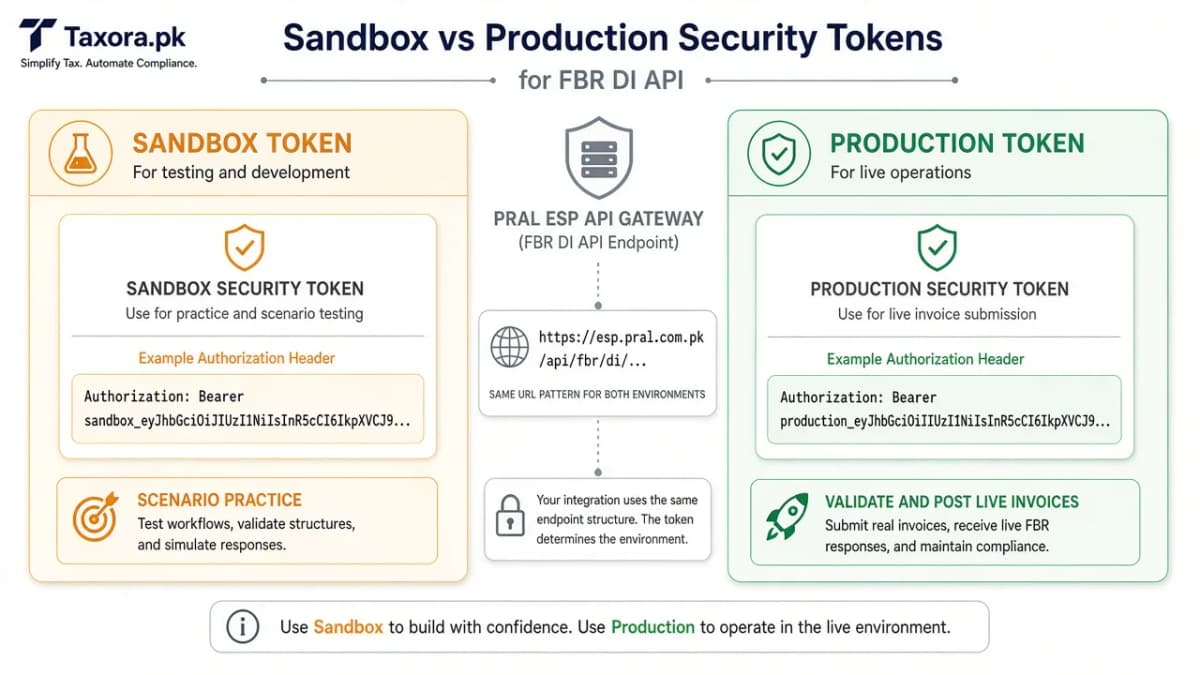
FBR’s Digital Invoicing API (on PRAL’s platform) is locked with a security token. The same validate and post URLs are used for practice and for live invoices - the token decides which world you are in. This guide follows FBR DI API technical documentation V1.12 and the DI user manual, then shows how Taxora.pk uses those tokens day to day.
Try sandbox vs production
Toggle the interactive panel to see which Taxora workflows each token unlocks. Sandbox = scenario practice. Production = validate/post for real invoices.
Try it live
Which token does Taxora use?
Authorization
Authorization: Bearer <sandbox-token>
Integration → FBR sandbox credentials. Use for scenario practice with test data.
In Taxora
- ✓ Run sandbox scenario sets
- ✓ Prove mapping before production
- ✗ Not for real tax invoices
PRAL issues both tokens - not Taxora. Same API URL pattern; the Bearer token selects the environment.
What the FBR docs say (short version)
- The Web API sits on PRAL ESP and exposes Digital Invoicing methods including Validate and Post (DI API V1.12).
- Every request needs a security token in the header:
Authorization: Bearer <token>. - PRAL issues the token with the API URLs. Documented validity is up to five years; request a new one before expiry.
- Sandbox and production use the same URL pattern; routing follows which token you send. Sample JSON differs between sandbox and production sections in the PDF - do not mix them.
Always prefer the live PDF over summaries: DI API V1.12 and DI User Manual V1.5.
Sandbox token - practice safely
- Finish IRIS Digital Invoicing registration and choose PRAL (or another licensed integrator).
- Whitelist the public IPs of the servers that will call the API (Taxora’s team helps with cloud IPs).
- Open the Sandbox Environment tab in the FBR/PRAL flow and copy the sandbox security token.
- Paste it into Taxora under Integration → FBR sandbox credentials (never commit tokens to chat logs or git).
- Run the assigned sandbox scenarios (buyer types, rates, debit/credit notes, etc.). Taxora’s scenario tools mirror those cases so you can practise with fake data before production.
Sandbox invoices are not live tax invoices. They exist to prove your mapping works before production. More on scenarios: sandbox scenarios explained.
Production token - live invoices
- Only after sandbox scenarios succeed, request production credentials from the same FBR/PRAL path.
- Store the production token only in Taxora’s Integration → FBR production credential fields.
- Create a real invoice, then validate and post. On success, keep the FBR invoice number and QR PDF.
- Treat production like cash: rotate access if staff leave; never reuse sandbox sample JSON in production.
How Taxora uses the token
When you click validate or post on a real invoice, Taxora builds the invoice object, attaches Authorization: Bearer … with your production token, and calls PRAL. Sandbox tokens stay reserved for scenario practice. Errors come back as human-readable messages where possible (HS, UOM, buyer, rate). Success stores the invoice number and QR for the PDF. Full day-to-day loop: how Taxora FBR invoicing works.
IP whitelist and tokens work together
A perfect token still fails if the call leaves from an IP that is not whitelisted. Whitelist first, then test the sandbox token, then production. Guide: sandbox and IP whitelisting.
Common mistakes
- Using the sandbox token after switching Taxora to “live”
- Copying production sample JSON into sandbox (or the reverse)
- Skipping scenarios and asking for production early
- Sharing Bearer tokens in WhatsApp screenshots
- Forgetting to renew before the five-year expiry window
Quick FAQ
Who issues the token? PRAL issues it as part of Digital Invoicing integration after IRIS steps - not Taxora.
Can one token do both sandbox and production? No. Use the sandbox token for practice and the production token for live invoices.
Is Taxora affiliated with FBR or PRAL? No. Independent software that calls the API with the credentials you registered.
Common questions
Who issues the FBR DI token?
PRAL issues the token after Digital Invoicing registration and whitelist steps - not Taxora.
Are sandbox and production URLs different?
Per DI API V1.12, URLs stay the same and routing follows the security token you send.
How long is a token valid?
FBR’s DI API documentation states validity of up to five years; request a new token before expiry.
More guides
- 01FBR Sandbox Scenarios ExplainedWhat sandbox scenario testing is for, why edge cases matter more than the happy path, and how to prepare your …Open
- 02PRAL vs Licensed Integrator vs Invoicing SoftwarePRAL’s free API path, paid licensed integrators, and managed invoicing software solve different jobs. A practi…Open
- 03FBR DI Sandbox & IP WhitelistingHow IRIS Digital Invoicing registration, IP whitelisting, sandbox tokens, and scenario testing work before pro…Open
- 04How to Connect PRAL for FBR Digital InvoicingA practical walkthrough of IRIS Digital Invoicing registration, PRAL or licensed integrator selection, IP whit…Open