
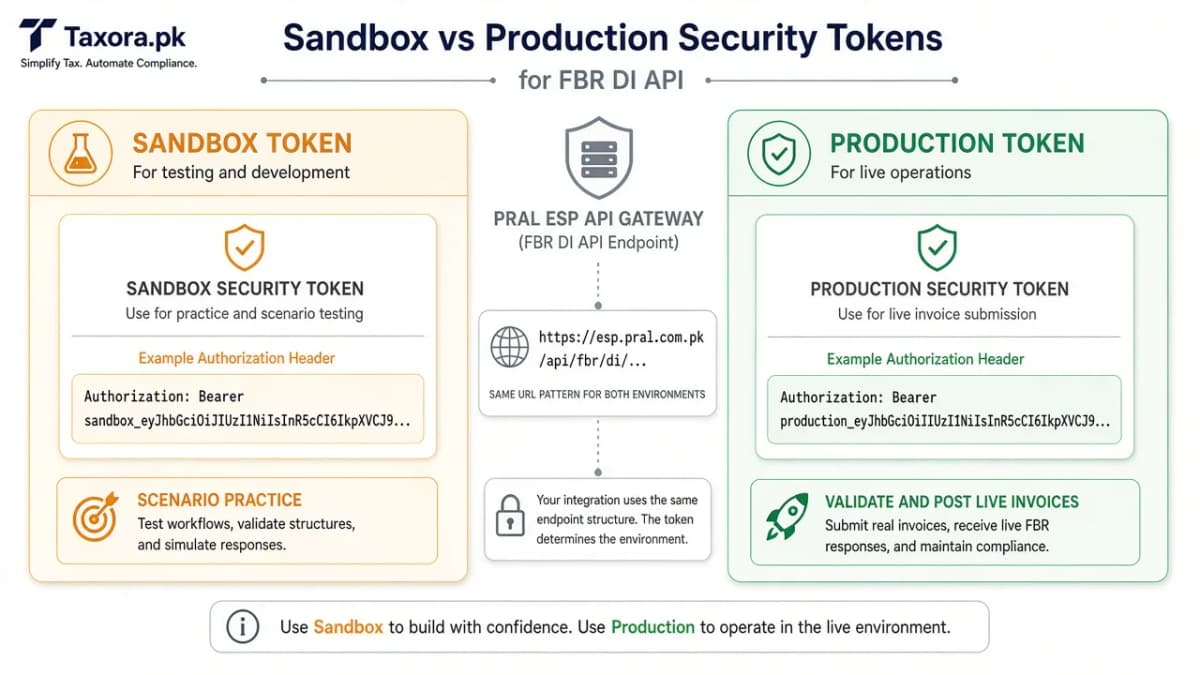
FBR کی Digital Invoicing API (PRAL پلیٹ فارم) سیکیورٹی ٹوکن سے بند ہے۔ مشق اور لائیو دونوں کے لیے validate/post URL ایک جیسے ہو سکتے ہیں - ٹوکن فیصلہ کرتا ہے آپ کس دنیا میں ہیں۔ یہ گائیڈ DI API V1.12 اور یوزر مینوئل کے بعد ٹیکسورا میں روزمرہ استعمال دکھاتی ہے۔
دستاویزات کیا کہتی ہیں
Bearer ٹوکن Authorization ہیڈر میں جاتا ہے۔ سینڈ باکس منظرنامے پاس کرنے کے بعد پروڈکشن ٹوکن ملتا ہے۔
URL اکثر ایک جیسے رہتے ہیں؛ ماحول ٹوکن سے منتخب ہوتا ہے۔
سینڈ باکس ٹوکن
ٹیسٹ ڈیٹا اور تفویض شدہ منظرناموں کے لیے۔ حقیقی گاہک انوائس یہاں مت پوسٹ کریں۔
ٹیکسورا میں Integration → FBR کے تحت سینڈ باکس ٹوکن محفوظ کریں اور منظرنامے مکمل کریں۔
پروڈکشن ٹوکن
اصل انوائس validate/post کے لیے۔ شیئرڈ ڈیمو اکاؤنٹ میں پروڈکشن ٹوکن مت چسپاں کریں۔
ٹیکسورا میں الگ سلاٹ: سینڈ باکس اور پروڈکشن دونوں رکھیں، کام کے وقت درست والا چنیں۔
عام سوالات
Who issues the FBR DI token?
PRAL issues the token after Digital Invoicing registration and whitelist steps - not Taxora.
Are sandbox and production URLs different?
Per DI API V1.12, URLs stay the same and routing follows the security token you send.
How long is a token valid?
FBR’s DI API documentation states validity of up to five years; request a new token before expiry.
مزید گائیڈز
- 01FBR Sandbox Scenarios ExplainedWhat sandbox scenario testing is for, why edge cases matter more than the happy path, and how to prepare your …Open
- 02PRAL vs Licensed Integrator vs Invoicing SoftwarePRAL’s free API path, paid licensed integrators, and managed invoicing software solve different jobs. A practi…Open
- 03FBR DI Sandbox & IP WhitelistingHow IRIS Digital Invoicing registration, IP whitelisting, sandbox tokens, and scenario testing work before pro…Open
- 04How to Connect PRAL for FBR Digital InvoicingA practical walkthrough of IRIS Digital Invoicing registration, PRAL or licensed integrator selection, IP whit…Open